

Is There a 7Gear Casino App?
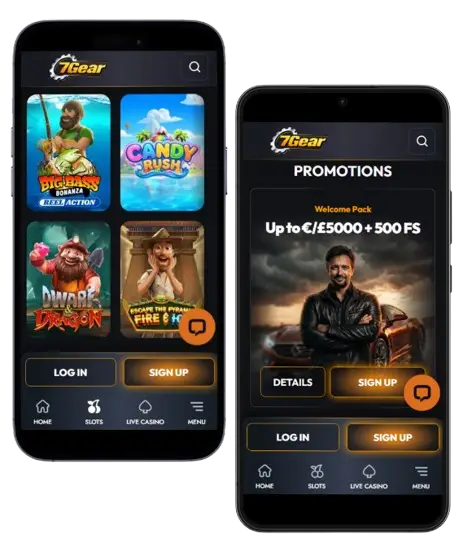
There is no official 7Gear app in the App Store or Google Play. Only install 7Gear through the official browser-based site; any file offered as a "7Gear APK" outside the official channels is not an official file and should be avoided. Rather than releasing a native app, 7Gear invested in a mobile-first responsive site backed by a Progressive Web App install that produces an app-like standalone launcher. For players unfamiliar with PWAs, the effect after install is nearly identical to a native app: home-screen icon, full-screen play, instant launch.
What You Get on the 7Gear Mobile Site
The 7Gear mobile version is not a stripped-down variant of the desktop experience. It carries every game in the catalogue, every ongoing promotion, the full cashier and 24/7 live chat. Registration and KYC document upload work directly from the mobile browser, using the device camera for photo capture.
Slot titles render in portrait by default, with feature-heavy releases auto-rotating to landscape. Evolution and Absolute Live Gaming streams run at desktop-tier quality, though a stable connection is important — playing on marginal data can drop mid-round. Ongoing promotions — the weekly 5% cashback, Wednesday free spins, weekend reload and Fortune Wheel — all trigger on mobile deposits at the same £20 minimum as desktop. Full bonus mechanics and welcome-pack terms sit on the 7Gear bonus page.
How to Install 7Gear as a Progressive Web App
Because 7Gear runs as a PWA, installation on any modern iPhone, iPad or Android device takes under thirty seconds through the built-in browser share menu. There is no store approval, no download progress bar and no permissions warning — the browser writes a home-screen icon that launches the site in standalone mode. Instructions differ slightly between iOS and Android.
iOS Install — Safari on iPhone or iPad
Safari is the only iOS browser currently supporting Add to Home Screen for PWAs. Chrome for iOS does not offer this install route.
- Open Safari and navigate to the 7Gear site
- Tap the Share button (square with upward arrow) at the bottom of the screen
- Scroll the share sheet options to find Add to Home Screen
- Rename the icon if preferred, then tap Add in the top-right corner
- The 7Gear icon appears on the home screen and launches in standalone mode
Standalone mode hides Safari's URL bar for an app-like experience — the site behaves visually and functionally identical to a native app for slot and live play, cashier and support.
Android Install — Chrome or Chromium Browsers
Chrome and most Chromium-based Android browsers detect PWAs automatically and often offer an Install app prompt at first visit.
- Open Chrome and navigate to the 7Gear site
- Tap the three-dot menu in the top-right corner
- Select Add to Home screen — or Install app when Chrome recognises the PWA
- Confirm the icon name and tap Add or Install
- The 7Gear icon appears on the home screen and launches in standalone mode
Only use the official browser-based site; any file offered as a 7Gear APK on third-party download sites is not an official file and should be avoided.
Games Available on the 7Gear Mobile Browser
Every category in the 7Gear lobby renders on mobile — slots, live dealer tables, game shows and instant titles. Slot output from Pragmatic Play, Hacksaw Gaming, BGaming, Playson and 1spin4win runs at full frame rate on smartphones from 2022 onwards; older devices may drop feature animations on premium releases but retain full playability.
Live dealer content from Evolution — Crazy Time, Lightning Roulette, VIP Blackjack — streams at 720p or 1080p depending on connection. Aviator, the Chicken Road series and Plinko 2 retain the same fast tap-response behaviour as desktop. Bonus contribution rates are identical: slots 100%, live 10%, table 5%, instant 0% — players clearing an active bonus should stick to slots.
| CRITERION | 7GEAR | CASINACHO ★ |
|---|---|---|
| Game catalogue | 20+ studios | 7,500+ titles |
| Live casino | Live dealer tables | 400+ Evolution tables |
| Welcome offer | up to £5,000 + 500 FS | £3,000 + 200 spins |
| Bonus wagering | 40x wagering | Lighter requirements |
| Crypto payouts | Cards & crypto | Fast crypto payouts |
| Sports betting | Full sportsbook | Casino-focused |
7Gear Mobile Cashier — Deposits and Withdrawals
The mobile cashier supports every payment method available on desktop, plus Apple Pay on iOS and Google Pay on Android — the fastest routes for a same-device deposit and the reason many players prefer mobile over desktop card entry.
Cryptocurrency deposits work on mobile by copying the wallet address to an on-device wallet — often faster than card entry. Withdrawal times mirror desktop: 0–1 hour for e-wallets, 1–5 days for cards, 1–7 for bank transfer. KYC verification is required before the first withdrawal; account setup is covered on the 7Gear registration page.
Mobile vs Desktop at 7Gear — Practical Trade-offs
Neither format is strictly better for 7Gear play; each suits different session profiles. The comparison below distils the practical trade-offs for daily play.
| Feature | Mobile browser (PWA) | Desktop |
|---|---|---|
| Convenience | Excellent — one-tap launch from home screen | Fixed to workstation |
| Payment speed | Apple Pay / Google Pay one-tap | Card entry standard |
| Live stream quality | Connection-dependent, up to 1080p | Consistent on wired broadband |
| Screen size for multi-table | Limited on phones | Best for multiple tables |
| KYC document capture | Device camera direct upload | Scan or file upload |
| Storage footprint | Near zero (PWA) | None (browser) |
Mobile suits quick sessions, one-tap payments and camera-based KYC; desktop suits longer sessions and multi-table live play. Both share the same account, cashier, bonuses and 40× wagering terms — the full welcome pack sits on the 7Gear bonus page, and account setup on the registration page.